1
2
3
4
5
6
7
8
9
10
11
12
13
14
15
16
17
18
19
20
21
22
23
24
25
26
27
28
29
30
31
32
33
34
35
36
37
38
39
40
41
42
43
44
45
46
47
48
49
50
51
52
53
54
55
56
57
58
59
60
61
62
63
64
65
66
67
68
69
70
71
72
73
74
75
76
77
78
79
80
81
82
83
84
85
86
87
88
89
90
91
92
93
94
95
96
97
98
99
100
101
102
103
104
105
106
107
108
109
110
111
112
113
114
115
116
117
118
119
120
121
122
123
124
125
126
127
128
129
130
131
132
133
134
135
136
137
138
139
140
141
142
143
144
145
146
147
148
149
150
151
152
153
154
155
156
157
158
159
160
161
162
163
164
165
166
167
168
169
170
171
172
173
174
175
176
177
178
179
180
181
182
183
184
185
186
187
188
189
190
191
192
193
194
195
196
197
198
199
200
201
202
203
204
205
206
207
208
209
210
211
212
213
214
215
216
217
218
219
220
221
222
223
224
225
226
227
228
229
230
231
232
233
234
235
236
237
238
239
240
241
242
243
244
245
246
247
248
249
250
251
252
253
254
255
256
257
258
259
260
261
262
263
264
265
266
267
268
269
270
271
272
273
274
275
276
277
278
279
280
281
282
283
284
285
286
287
288
289
290
291
292
293
294
295
296
297
298
299
300
301
302
303
304
305
306
307
308
309
310
311
312
313
314
315
316
317
318
319
320
321
322
323
324
325
326
327
328
329
330
331
332
333
334
335
336
337
338
339
340
341
342
343
344
345
346
347
348
349
350
351
352
353
354
355
356
357
358
359
360
361
362
363
364
365
366
367
368
369
370
371
372
373
374
375
376
377
378
379
380
381
382
383
384
385
386
387
388
389
390
391
392
393
394
395
396
397
398
399
400
401
402
403
404
405
406
407
408
409
410
411
412
413
414
415
416
417
418
419
420
421
422
423
424
425
426
427
428
429
430
431
432
433
434
435
436
437
438
439
440
441
442
443
444
445
446
447
448
449
450
451
452
453
454
455
456
457
458
459
460
461
462
463
464
465
466
467
468
469
470
471
472
473
474
475
476
477
478
479
480
481
482
483
484
485
486
487
488
489
490
491
492
493
494
495
496
497
498
499
500
501
502
503
504
505
506
507
508
509
510
511
512
513
514
515
516
517
518
519
520
521
522
523
524
525
526
527
528
529
530
531
532
533
534
535
536
537
538
539
540
541
542
543
544
545
546
547
548
549
550
551
552
553
554
555
556
557
558
559
560
561
562
563
564
565
566
567
568
569
570
571
572
573
574
575
576
577
578
579
580
581
582
583
584
585
586
587
588
589
590
591
592
593
594
595
596
597
598
599
600
601
602
603
604
605
606
607
608
609
610
611
612
613
614
615
616
617
618
619
620
621
622
623
624
625
626
627
628
629
630
631
632
633
634
635
636
637
638
639
640
641
642
643
644
645
646
647
648
649
650
651
652
653
654
655
656
657
658
659
660
661
662
663
664
665
666
667
668
669
670
671
672
673
674
675
676
677
678
679
680
681
682
683
684
685
686
687
688
689
690
691
692
693
694
695
696
697
698
699
700
701
702
703
704
705
706
707
708
709
710
711
712
713
714
715
716
717
718
719
720
721
722
723
724
725
726
727
728
729
730
731
732
733
734
735
736
737
738
739
740
741
742
743
744
745
746
747
748
749
750
751
752
753
754
755
756
757
758
759
760
761
762
763
764
765
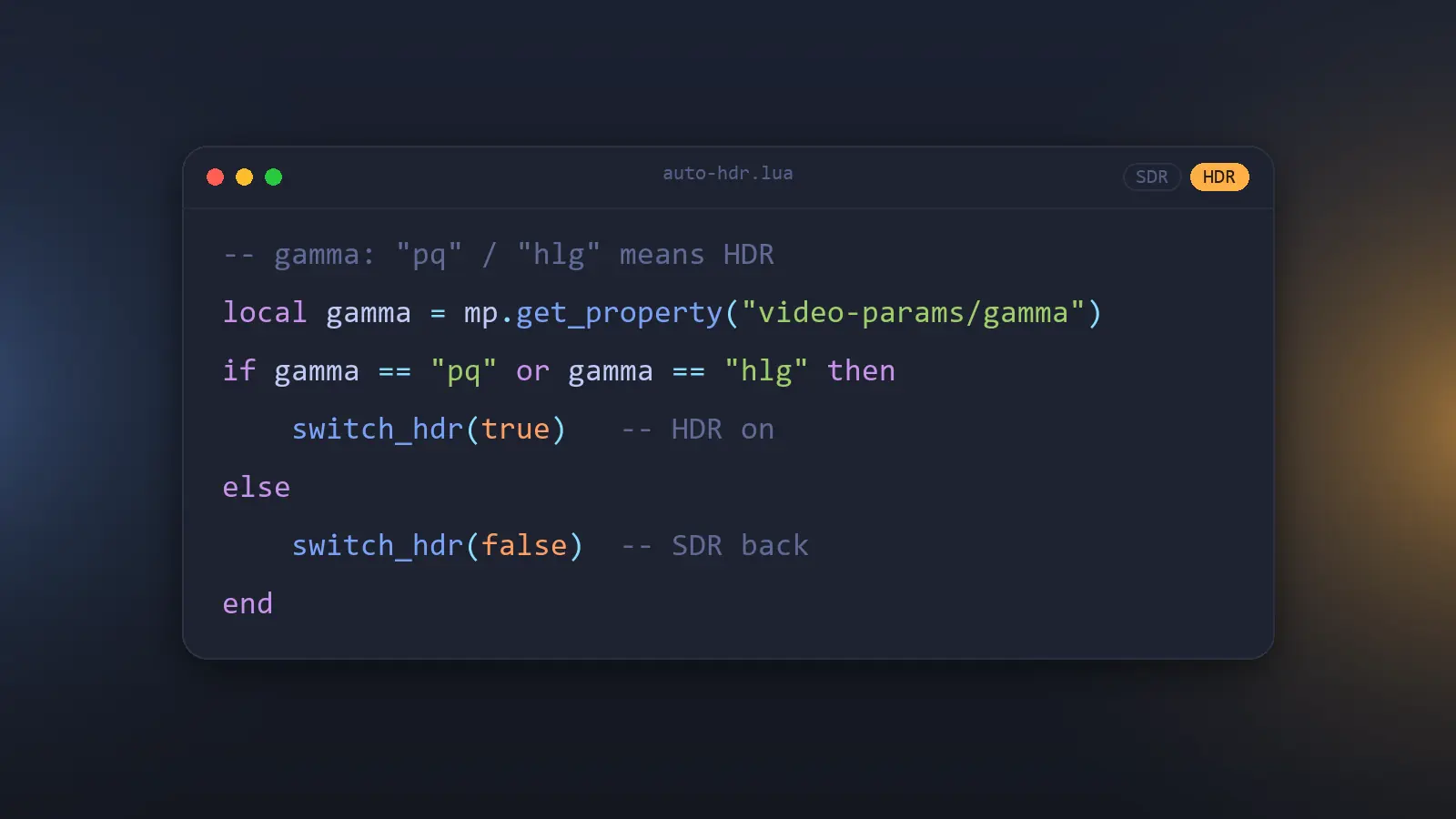
| --[[
MPV Auto HDR Switcher for Windows
自动检测 HDR 视频并无缝切换 Windows 系统的 HDR 状态。
设计要点:
* 系统 HDR 的真实状态以 HDRCmd.exe 的退出码为准(0=开 / 1=关 / 2=不支持),
每次决策前都异步实时复核,不再使用"启动时读一次"的影子状态。
查询与执行之间仍有几十毫秒的时间窗,手动"关→开"这种快速翻转也无法可靠识别所有权。
* 视频是否 HDR:文件名命中 HDR 标签时直接按 HDR 处理(不等元数据);
否则以 video-params/gamma 为准("pq"/"hlg" 即 HDR),gamma 未标记("auto")时
借助 primaries / sig-peak,仍不确定才用文件名兜底。
* 只在需要切换、或显示器仍在物理握手时才暂停画面,切完回退到开头以避免丢首帧;
用户自己按的暂停不接管。系统本来就处于目标状态时通常不做任何停顿
(首次启动时缓存为空,会先暂停等一次查询,约 22ms)。
]]
-- ==================== 用户配置区域 ====================
-- English: the only values you normally edit.
-- hdr_cmd_path path to HDRCmd.exe (double the backslashes in Lua)
-- handshake_delay_on/off seconds to wait for your display's black-screen handshake when HDR is
-- switched on/off — too short misses the first frames, too long pauses longer
-- (3.9 is the measured value for this machine)
-- turn_off_delay debounce before switching back to SDR after playback ends
-- debug true prints log lines prefixed [auto_hdr] (see DEVELOPER.md §6)
-- Details and the rest of this file are in Chinese: README.md / DEVELOPER.md.
local options = {
-- HDRCmd.exe 的绝对路径(注意:Lua 中需使用双反斜杠 \\)
hdr_cmd_path = "C:\\Program Files\\mpv\\HDRCmd.exe",
-- 防漏帧延迟:显示器切换 HDR/SDR 时的黑屏物理握手时间(秒)。
-- 开 HDR 的黑屏通常比关更长,故分开配置,可根据自己屏幕的表现微调。
-- 3.9 是本机实测值(3.8 会漏掉开头几帧);换显示器要重新调,见 DEVELOPER.md 第 5 节。
handshake_delay_on = 3.9,
handshake_delay_off = 3.9,
-- 延迟关闭时间:播放结束后延迟关闭 HDR 的缓冲(秒)。
-- 为切集、选片提供防抖,避免关了又开。
turn_off_delay = 2.5,
-- 元数据检测:轮询间隔(秒)与最长等待时间(秒)。
-- 第一帧解出来之前 video-params 不可用,超过等待时间则启用文件名兜底。
check_interval = 0.1,
metadata_timeout = 1.5,
-- "最近一次查到的系统状态"可信多久(秒)。只用于打开文件时决定要不要先锁住画面,
-- 真正的切换决策一律实时查询,不读这个缓存。
state_cache_ttl = 1.5,
-- 调试日志:设为 true 后,mpv 日志里会打印状态查询结果、元数据判定与命令执行结果
-- 日志前缀是 [auto_hdr];终端版 mpv.com 直接可见,GUI 版按 ~ 打开控制台查看
debug = false
}
-- ======================================================
local script_turned_on = false -- 系统 HDR 是本脚本开启的(决定片尾是否可以关)
local paused_by_script = false -- 当前暂停是本脚本造成的(只解除自己造成的暂停)
local unpause_timer = nil -- "握手完成后解除暂停"的定时器
local check_timer = nil -- 元数据轮询定时器
local turn_off_timer = nil -- 播放结束后的关机倒计时
local current_playing_path = "" -- 当前视频路径,用于避免 seek/重载时重复触发检测
local generation = 0 -- 每次开始加载新文件 / 文件被卸载都 +1,用于丢弃上一部影片遗留的异步回调
local restage_current_file -- 前置声明(定义在事件区):切换回调过期时按当前状态重新收尾
-- 物理握手属于**显示器**,不属于某个文件:切集可以丢弃上一部影片的回调,
-- 但显示器还黑着这件事必须沿用,否则新文件会在剩余黑屏里开播(漏首帧)。
local handshake_until = -math.huge -- 最近一次切换的握手截止时间(mp.get_time 基准)
local turn_on_inflight = 0 -- 已下发、回调还没返回的 on 数量(退出时要补关)
local inflight_on_requests = {} -- 在途 on 的异步请求 id,退出时可以逐个 abort
local shutting_down = false -- 已进入退出流程:不再产生新的异步工作
local state_version = 0 -- 每次切换命令开始/进程结束都 +1:在途查询的读数据此作废
local switch_inflight = 0 -- 未结算的切换命令数(进程在跑,或结果还在回读)
local switch_cap_until = -math.huge -- 命令迟迟不返回时最多等到这里,避免画面永久暂停
local SWITCH_WAIT_CAP = 10 -- 秒;超过这个宽限就不再等命令
local switch_cap_warned = false -- 超时降级只提示一次
local pending_final_off = false -- 退出时曾有在途 on:shutdown 里再补一次 off
-- 系统 HDR 状态缓存:cached_state 为 true/false;nil 表示"不支持 HDR 或查询失败"
local cached_state = nil
local cached_state_valid = false
local cached_state_time = -math.huge
local state_waiters = nil -- 合并同一时刻的并发查询
-- 注意:mpv 的 mp.msg.* 不做 printf 替换(多个参数会被空格拼接),
-- 需要格式化时必须自己 string.format。
local function log(fmt, ...)
if options.debug then
mp.msg.info(string.format(fmt, ...))
end
end
local function info(fmt, ...)
mp.msg.info(string.format(fmt, ...))
end
local function err(fmt, ...)
mp.msg.error(string.format(fmt, ...))
end
-- ==================== HDRCmd 调用层 ====================
-- 直接调用 HDRCmd.exe,不经 PowerShell:
-- * mpv 的 subprocess 在 Windows 上就是 CreateProcessW,拿到的是**真实退出码**,
-- 不再需要 `exit $LASTEXITCODE` 那种透传技巧(0=开 / 1=关 / 2=不支持 原样可读);
-- * 少一次 PowerShell 冷启动(实测约 0.7s/次,而每次切换要调两次);
-- * 路径写错时 mpv 直接给出 error_string == "init",
-- 而不是像经 PowerShell 包装那样"进程起来了、退出码却是 0"被误读成"HDR 已开启";
-- * 路径里的空格与引号不用自己转义。
local function hdrcmd_args(extra)
local args = {options.hdr_cmd_path}
for _, arg in ipairs(extra) do
args[#args + 1] = arg
end
return args
end
-- 统一的外部调用:始终 capture + playback_only=false,
-- 避免"当前播放项一结束就被 mpv 杀掉子进程"导致命令实际没执行。
local function run_hdrcmd(extra, callback)
local args = {
name = "subprocess",
args = hdrcmd_args(extra),
capture_stdout = true,
capture_stderr = true,
playback_only = false
}
if callback then
-- 返回请求 id,on 在途时可以 abort(见 abort_inflight_on)
return mp.command_native_async(args, callback)
else
return mp.command_native(args)
end
end
-- 退出路径:尽量取消还没结束的 on。
-- 取消只代表"别让进程继续跑",**不代表已经发生的系统状态被撤销**,
-- 所以调用方必须在取消之后再同步下发一次 off(两者都要做)。
local function abort_inflight_on()
if mp.abort_async_command then
for req in pairs(inflight_on_requests) do
mp.abort_async_command(req)
end
end
inflight_on_requests = {}
end
-- 是否真的执行成功(进程起不来时 mpv 不抛错,只在结果里体现:error_string == "init")
local function hdrcmd_alive(success, result)
return success and type(result) == "table"
and result.error_string ~= "init"
and result.killed_by_us ~= true
end
-- 查询系统真实状态。**切换决策一律用实时查询,不读缓存**:
-- 缓存只用于 file-loaded 决定"要不要在查询前先锁住画面"。
-- 否则用户在缓存有效期(1.5 秒)内手动开关 HDR 时,脚本可能把用户的操作
-- 认领成"自己开的",片尾再替人关掉。
local function query_hdr_state(callback)
-- 同一时刻的多个请求合并成一次查询
if state_waiters then
state_waiters[#state_waiters + 1] = callback
return
end
state_waiters = {callback}
local function start()
local qver = state_version -- 这次查询属于哪个"切换版本"的世界
run_hdrcmd({"status", "-m", "x"}, function(success, result)
local state = nil
if hdrcmd_alive(success, result) then
local code = result.status
-- HDRCmd 的 `status -m x` 只返回退出码、不打印文本(文本在默认 short 模式):
-- 0=开 / 1=关 / 2=不支持,其它值(含异常退出)一律当作"查不到"整体旁路。
if code == 0 then
state = true
elseif code == 1 then
state = false
end
log("系统 HDR 状态:%s(退出码 %s)", tostring(state), tostring(code))
else
log("系统 HDR 状态查询失败:success=%s error=%s", tostring(success),
tostring(type(result) == "table" and result.error_string or "?"))
end
-- 查询期间有切换命令开始或落地:这次读数属于切换前的世界,不能拿来决策。
-- 保留现有 waiter 重查一次 —— 切换后的重判(restage)正是靠这一步拿到真实状态,
-- 否则会把"关闭前读到的 on"当成关闭后的状态,让 HDR 片在 SDR 下播。
if qver ~= state_version then
log("状态查询期间发生了切换,这次读数作废并重查")
if shutting_down then
state_waiters = nil
return
end
start()
return
end
cached_state = state
cached_state_valid = true
cached_state_time = mp.get_time()
-- 先摘下全局表再交付:交付过程中(finish → restage → 新查询)
-- 新加入的请求会另起一次查询,不会被正在遍历的这张表吞掉
local waiters = state_waiters
state_waiters = nil
for _, cb in ipairs(waiters) do
cb(state)
end
end)
end
start()
end
-- ==================== 暂停的所有权管理 ====================
local function hold_pause()
-- 已经是暂停状态(`--pause` 启动、用户在检测期间自己按的暂停)就不要接管:
-- 一旦接管,后面的 release_pause* 会把用户的暂停顶掉
if mp.get_property_bool("pause") then return end
paused_by_script = true
mp.set_property_bool("pause", true)
end
-- 还有未结算的切换命令吗?
-- "结算"包括进程结束之后的失败回读:回读完成前,这次切换的结果还不算数
-- (回读本身不改 HDR,但它决定这次操作是成功、失败还是未知)。
-- 超过 switch_cap_until 后不再等待:宁可放画面,也不能因为命令卡死把播放永久暂停。
local function switch_waiting()
if switch_inflight <= 0 then return false end
if mp.get_time() < switch_cap_until then return true end
if not switch_cap_warned then
switch_cap_warned = true
err("切换命令超时未返回,按降级策略恢复播放(显示器可能稍后才切换)")
end
return false
end
-- 物理握手结束后归还暂停。
-- 定时器到点时会**再核对一次**:等待期间可能又有切换开始/落地,或命令还没结算,
-- 这时要按新的状态重排,而不能按旧时间把画面放出来 —— 否则新文件的
-- 黑屏还没结束就开始播,正是初版"上一部片子的握手解除新文件暂停"那个 bug 的翻版。
local function release_pause_after(delay)
if unpause_timer then unpause_timer:kill() end
unpause_timer = mp.add_timeout(delay, function()
unpause_timer = nil
if not paused_by_script then return end
if switch_waiting() then
release_pause_after(0.2) -- 命令还没结算,稍后再看(有 switch_cap_until 兜底)
return
end
local remain = handshake_until - mp.get_time()
if remain > 0 then
release_pause_after(remain)
return
end
paused_by_script = false
mp.set_property_bool("pause", false)
end)
end
-- 立即归还暂停(仅当暂停是本脚本造成的)。
-- 显示器还在物理握手时不能立刻放画面,改为等剩余时间。
local function release_pause()
if unpause_timer then
unpause_timer:kill()
unpause_timer = nil
end
local switching = switch_waiting()
local remain = handshake_until - mp.get_time()
-- 没有现成暂停,但显示器还在黑屏(或切换命令还没结算):
-- 当前文件需要一份播放保护,否则它会在黑屏里开播。
-- 用户自己暂停的不接管(hold_pause 自带守卫)。
if not paused_by_script and (switching or remain > 0)
and mp.get_property("path", "") ~= "" then
hold_pause()
end
if not paused_by_script then return end
if switching then
release_pause_after(0.2)
return
end
if remain > 0 then
release_pause_after(remain)
return
end
paused_by_script = false
mp.set_property_bool("pause", false)
end
local function cancel_turn_off_timer()
if turn_off_timer then
turn_off_timer:kill()
turn_off_timer = nil
end
end
-- ==================== 切换动作 ====================
-- 回退到开头,补齐检测/握手期间已经播掉的画面
local function rewind_if_needed()
local pos = mp.get_property_number("time-pos", 0)
if pos and pos > 0 and pos < 2.0 then
mp.commandv("seek", 0, "absolute+exact")
end
end
-- 执行一次真正的切换(先暂停,再下发命令,握手完成后恢复播放)
local function do_switch_command(turn_on, trigger_reason)
local delay = turn_on and options.handshake_delay_on or options.handshake_delay_off
local action = turn_on and "on" or "off"
local gen = generation -- 发起时的代次:回调回来时用它判断文件是否已经变了
-- 从下发这一刻起就延长握手截止时间:命令回调可能比旧的等待定时器晚到
-- (冷启动、杀毒扫描等),只在回调里刷新会留下"旧定时器先到点把画面放了"的窗口。
-- 用 max 而不是直接覆盖:开关延迟分开配置时,后一次较短的等待不应缩短
-- 前一次还没结束的黑屏;后一条命令失败时也不该顺手把前一次的有效等待抹掉。
handshake_until = math.max(handshake_until, mp.get_time() + delay)
-- 新的切换世界:在这之前启动的状态查询,读数都不再可信(见 query_hdr_state)
state_version = state_version + 1
switch_inflight = switch_inflight + 1
switch_cap_warned = false
switch_cap_until = math.max(switch_cap_until, mp.get_time() + delay + SWITCH_WAIT_CAP)
hold_pause()
-- 看门狗:命令一直不返回时 finish() 永远不会来,必须从现在起就有定时器检查上限,
-- 否则首次切换会永久停在暂停上(release_pause_after 自己会按 switch_waiting 轮询)。
if paused_by_script then release_pause_after(0.2) end
rewind_if_needed()
mp.osd_message(turn_on and "HDR: 正在准备开启..." or "HDR: 正在切回 SDR...", 2)
if turn_on then turn_on_inflight = turn_on_inflight + 1 end
local req
local callback_ran = false
req = run_hdrcmd({action}, function(success, result)
callback_ran = true
-- 命令进程已经结束:它的回调与后续回读都发生在"命令之后的世界"
state_version = state_version + 1
if turn_on and req then inflight_on_requests[req] = nil end
-- 退出流程中:退出路径已经(或即将)同步下发 off,这里不再 settle、不再查状态。
-- 注意计数故意保留:shutdown 还要靠 turn_on_inflight 补一次 off。
if shutting_down then return end
local alive = hdrcmd_alive(success, result)
local code = alive and result.status or nil
log("HDRCmd %s 结束:success=%s status=%s", action, tostring(success), tostring(code))
local function settle(state)
-- 切换真的生效:以命令落地的时间为起点刷新物理握手截止时间(只延长,不缩短)
if (turn_on and state == true) or ((not turn_on) and state == false) then
handshake_until = math.max(handshake_until, mp.get_time() + delay)
end
if turn_on then
if state == true then
script_turned_on = true
mp.msg.info("HDR 已开启(" .. trigger_reason .. ")")
mp.osd_message("HDR: 自动开启 (" .. trigger_reason .. ")", 2)
else
script_turned_on = false
err("HDR 开启失败,系统状态:%s", tostring(state))
mp.osd_message("HDR: 开启失败,请检查 HDRCmd", 3)
end
else
if state == false then
script_turned_on = false
mp.msg.info("HDR 已关闭(" .. trigger_reason .. ")")
mp.osd_message("HDR: 自动恢复 SDR", 2)
else
-- 没关掉就保留标记,后续(片尾/退出)还有机会重试
err("HDR 关闭失败,系统状态:%s", tostring(state))
mp.osd_message("HDR: 关闭失败,请检查 HDRCmd", 3)
end
end
end
-- 命令发出到回调之间,用户可能已经切集或停止播放:这份结论属于上一部影片,
-- 不能拿它给新文件排"握手后解除暂停",也不能把 HDR 晾在空闲状态上。
local function finish()
if gen ~= generation or mp.get_property("path", "") == "" then
restage_current_file()
else
release_pause()
end
end
-- 到这里这次切换才算"结算":进程结束还不够,非零退出时还要等回读结果。
-- 退出路径靠这两个计数判断是否还有未收尾的工作。
local function operation_done()
switch_inflight = math.max(switch_inflight - 1, 0)
if turn_on then turn_on_inflight = math.max(turn_on_inflight - 1, 0) end
end
if code == 0 then
-- 退出码 0 表示结果与请求一致,直接采信并刷新缓存
cached_state = turn_on
cached_state_valid = true
cached_state_time = mp.get_time()
settle(turn_on)
operation_done()
finish()
else
-- 退出码异常:以回读到的真实状态为准,避免"假成功"污染内部状态
cached_state_valid = false
query_hdr_state(function(state)
if shutting_down then return end
settle(state)
operation_done()
finish()
end)
end
end)
if turn_on and req and not callback_ran and not shutting_down then
inflight_on_requests[req] = true
end
end
-- 供片尾/退出复用的关闭动作(sync=true 用于 mpv 退出前的同步下发)
local function turn_off_hdr(label, sync)
info("%s:关闭系统 HDR", label)
mp.osd_message("HDR: 自动恢复 SDR", 3)
-- 与切换命令同理:下发即视为显示器进入握手,避免旧的解除暂停定时器提前放行(只延长,不缩短)
local delay = options.handshake_delay_off
handshake_until = math.max(handshake_until, mp.get_time() + delay)
state_version = state_version + 1 -- 在途查询的读数属于"关闭之前的世界"
local gen = generation -- 发起时的代次:异步回调回来时用它判断是否已经有新文件
if sync then
-- 退出路径必须同步阻塞,否则播放器进程销毁后命令送不到
local res = mp.command_native({
name = "subprocess",
playback_only = false,
args = hdrcmd_args({"off"})
})
-- 进程起不来时 mpv 不抛错,只在结果里体现;退出码 0 才代表 HDRCmd 真的关了
-- (1 = 结果与请求不符,-1 = API 失败)。没关成功就保留标记,
-- 随后触发的 shutdown 还会再试一次。
if res and res.error_string ~= "init" and res.killed_by_us ~= true and res.status == 0 then
script_turned_on = false
-- 刻意不清 turn_on_inflight:退出路径要靠它决定是否在 shutdown 里再补一次 off
cached_state = false
cached_state_valid = true
cached_state_time = mp.get_time()
else
err("退出时关闭 HDR 未成功(status=%s),保留状态标记以便重试",
tostring(res and res.status))
end
return
end
switch_inflight = switch_inflight + 1
switch_cap_warned = false
switch_cap_until = math.max(switch_cap_until, mp.get_time() + delay + SWITCH_WAIT_CAP)
-- 看门狗(后台关闭时若还持有脚本暂停,命令卡死同样不能永久暂停)
if paused_by_script then release_pause_after(0.2) end
run_hdrcmd({"off"}, function(success, result)
switch_inflight = math.max(switch_inflight - 1, 0)
state_version = state_version + 1
if shutting_down then return end
local status = hdrcmd_alive(success, result) and result.status or nil
if status == 0 then
-- 以命令真正落地的时间为准刷新握手截止时间(只延长,不缩短)
handshake_until = math.max(handshake_until, mp.get_time() + delay)
script_turned_on = false
cached_state = false
cached_state_valid = true
cached_state_time = mp.get_time()
else
err("关闭 HDR 未成功(status=%s),保留状态标记以便重试", tostring(status))
end
-- 关闭期间恰好有文件开始播:它可能已经按"系统还是 HDR"做过判断
-- (判成无缝衔接,于是什么也没做)。现在 HDR 真的被关了,
-- 得让它按当前状态重跑一次,否则 HDR 片会在 SDR 下播。
if gen ~= generation and status == 0 then
restage_current_file()
end
end)
end
-- 排定"播放结束后的延迟关闭"(防抖:期间来了新文件会被 start-file 取消)
--
-- 注意:配了 keep-open 时,播到结尾只是暂停在最后一帧,文件不会被卸载,
-- 因此 end-file 不会触发,HDR 保持开启 —— 这是有意的:播完往往还要拖进度条回看。
-- 真正会关闭 HDR 的时机是:退出 mpv、手动 stop(文件被卸载)、或切到 SDR 内容。
local function schedule_turn_off(reason)
if shutting_down or not script_turned_on then return end
cancel_turn_off_timer()
turn_off_timer = mp.add_timeout(options.turn_off_delay, function()
turn_off_timer = nil
if shutting_down then return end -- 退出流程自己会关,不再排新的异步工作
turn_off_hdr(reason, false)
end)
end
-- ==================== 核心决策 ====================
-- 依据系统真实状态决定是否需要切换
local function do_hdr_switch(is_movie_hdr, trigger_reason)
if shutting_down then return end
-- 快路径:SDR 内容且系统 HDR 不是本脚本开的 → 无论真实状态如何都无事可做,
-- 直接放行,省掉一次查询
if not is_movie_hdr and not script_turned_on then
log("SDR 内容且系统 HDR 非本脚本开启,无需处理(%s)", trigger_reason)
release_pause()
return
end
-- 记下**决策时**的代次。不能只在下面 do_switch_command 里记:
-- 查询 HDRCmd 的这几十毫秒里用户可能已经切集,那时命令是在新代次下发出的,
-- 光比对命令回调的代次就发现不了"拿上一部影片的结论去切新影片"。
local gen = generation
query_hdr_state(function(sys_hdr)
if shutting_down then return end
-- 查询期间用户切集或停止播放了:这份结论属于上一部影片,直接丢弃。
-- 这里连暂停都不要碰(新文件可能正处在自己的握手里),也不用收尾:
-- 切集时新文件自己的事件流会重新判定;停止播放时这条路径还没下发过任何命令。
if gen ~= generation then
log("状态查询回调时文件已变化,丢弃这次判定(%s)", trigger_reason)
-- 只是停止了播放(没有新文件接管):把脚本的暂停收回来,
-- 否则空闲状态会一直停在暂停上。有新文件时不要碰:
-- 它自己的检测流程会决定要不要沿用这份暂停。
if mp.get_property("path", "") == "" then
release_pause()
end
return
end
if sys_hdr == nil then
-- 不支持 HDR 或查询失败:不做任何停顿与调用
log("系统 HDR 状态不可用,跳过本次切换(%s)", trigger_reason)
mp.osd_message("HDR: 无法获取系统 HDR 状态,已跳过", 2)
release_pause()
return
end
if is_movie_hdr then
if sys_hdr then
mp.msg.info("检测到 HDR,系统已是 HDR,无缝播放(" .. trigger_reason .. ")")
mp.osd_message("HDR: 无缝衔接 (" .. trigger_reason .. ")", 2)
release_pause()
else
do_switch_command(true, trigger_reason)
end
else
-- 只关自己开的,系统原本的 HDR 状态不越权改动
if not sys_hdr then
-- 系统已经是 SDR(例如被手动关掉了),本脚本的标记随之失效
script_turned_on = false
release_pause()
elseif script_turned_on then
do_switch_command(false, trigger_reason)
else
release_pause()
end
end
end)
end
-- 识别文件名中的常见 HDR / 杜比视界标签
-- 标签必须落在词边界上:`HDRip`(HD Rip,纯 SDR 片源)里也有 "hdr" 子串,
-- 无边界的 string.find(name, "hdr") 会把这类资源一律预判成 HDR 并挡掉元数据纠正。
local function is_hdr_filename(name)
if not name or name == "" then return false end
-- 两端补 ".",让位于开头/结尾的标签也能吃到边界
local s = "." .. string.lower(name) .. "."
if s:find("[^a-z]hdr[^a-z]") -- hdr / hdr10 / hdr10+,排除 hdrip
or s:find("[^a-z]dovi[^a-z]") -- DoVi,同样要求词边界
or s:find("[^a-z]dolby[%s%.%-_]?vision[^a-z]")
or s:find("[%s%.%-_]dv[%s%.%-_]")
or s:find("[^a-z]smpte2084[^a-z]")
or s:find("[^a-z]hlg[^a-z]") then -- 同上,排除 hlgs 之类
return true
end
return false
end
-- 判定当前视频:返回 "hdr" / "sdr" / "unknown"(需文件名兜底) / "wait"(元数据未就绪)
local function classify_video()
local gamma = mp.get_property("video-params/gamma", "")
local primaries = mp.get_property("video-params/primaries", "")
local sig_peak = mp.get_property_number("video-params/sig-peak", 0)
local detail = string.format("gamma=%s primaries=%s sig-peak=%s",
tostring(gamma), tostring(primaries), tostring(sig_peak))
if gamma == "" then
-- 整个 video-params 节点还没就绪,继续等第一帧
return "wait", detail
end
if gamma == "pq" or gamma == "hlg" then
return "hdr", detail
end
if gamma == "auto" then
-- "auto" = 参数已知但传输特性未标记,不会自己变好:
-- 先用宽色域 / 高亮度这类辅助信号判断,仍不确定则交给文件名
if primaries == "bt.2020" or (sig_peak and sig_peak > 1.0) then
return "hdr", detail
end
return "unknown", detail
end
return "sdr", detail
end
-- ==================== 事件绑定 ====================
-- 新文件开始加载:取消上一集遗留的关机倒计时(物理握手的剩余等待要沿用)
mp.register_event("start-file", function()
generation = generation + 1
cancel_turn_off_timer()
-- 这里**不**丢弃挂起的"解除暂停"定时器:物理握手属于显示器而不是某个文件,
-- 新文件应当继承剩余等待,否则切集后会在黑屏没结束时开播(漏首帧)。
-- 新文件从**加载这一刻**就受保护:显示器还在黑屏、或切换命令还没结算时,
-- 先取得暂停。黑屏与新文件是 HDR 还是 SDR 无关,不必等元数据检测完。
-- 不依赖 path:start-file 触发时它可能还指向上一部文件。
if switch_waiting() or handshake_until > mp.get_time() then
hold_pause() -- 用户自己暂停时不接管
release_pause() -- 有归属就按剩余时间(或命令结算)排期
end
end)
-- 【首帧秒断】:文件名命中 HDR 标签时不必等元数据,直接进入决策
mp.register_event("file-loaded", function()
local path = mp.get_property("path", "")
if path == current_playing_path and path ~= "" then return end
if not is_hdr_filename(mp.get_property("filename", "")) then return end
current_playing_path = path
cancel_turn_off_timer()
if check_timer then check_timer:kill(); check_timer = nil end
-- 已知系统不是 HDR 时立刻锁住画面;已知已是 HDR 则不停顿,等复核结果。
-- 这里只是"要不要先锁画面"的启发式,所以只信 TTL 内的状态;
-- 真正的切换决策一律用实时查询(见 query_hdr_state)。
local cache_fresh = cached_state_valid
and (mp.get_time() - cached_state_time) < options.state_cache_ttl
if not (cache_fresh and cached_state == true) then
hold_pause()
end
do_hdr_switch(true, "文件名预判")
-- 预判路径不经过元数据检测,这里补一条快照,便于排查(仅调试模式)
if options.debug then
local snapshot_path = path
mp.add_timeout(1.0, function()
if mp.get_property("path", "") ~= snapshot_path then return end
local verdict, detail = classify_video()
log("(预判路径)元数据快照:%s -> %s", detail, verdict)
end)
end
end)
-- 元数据深度检测(playback-restart 也会在 seek 后触发,靠路径去重挡掉)
local function start_checking()
local path = mp.get_property("path", "")
if path == current_playing_path and path ~= "" then return end
current_playing_path = path
cancel_turn_off_timer()
if check_timer then check_timer:kill(); check_timer = nil end
-- 与 file-loaded 保持同一套策略:命中 HDR 标签就先按文件名定案。
-- 正常加载时走不到这里(file-loaded 已登记路径,上面的去重会返回),
-- 只有 restage_current_file() 的竞态重判需要这一步,
-- 免得"初次加载按文件名、重判按元数据"两套口径。
if is_hdr_filename(mp.get_property("filename", "")) then
do_hdr_switch(true, "文件名预判")
return
end
local deadline = mp.get_time() + options.metadata_timeout
local function check_step()
local verdict, detail = classify_video()
log("元数据检测:%s -> %s", detail, verdict)
if verdict == "wait" and mp.get_time() < deadline then
return false
end
if check_timer then check_timer:kill(); check_timer = nil end
if verdict == "hdr" then
do_hdr_switch(true, "元数据")
elseif verdict == "sdr" then
do_hdr_switch(false, "元数据")
elseif is_hdr_filename(mp.get_property("filename", "")) then
do_hdr_switch(true, "文件名兜底")
else
do_hdr_switch(false, verdict == "wait" and "元数据超时" or "元数据未标记")
end
return true
end
if not check_step() then
check_timer = mp.add_periodic_timer(options.check_interval, check_step)
end
end
mp.register_event("playback-restart", start_checking)
-- 切换命令的回调回来时文件已经换了(切集)或已经不在了(停止播放):
-- 上一部影片的结论不能拿来收尾,改为按当前状态重新判定一次。
-- 定义在这里是因为它要用到 start_checking(前置声明在文件上方)。
restage_current_file = function()
if shutting_down then return end
log("异步回调返回时文件已变化(切集或已停止),改为按当前状态收尾")
if mp.get_property("path", "") == "" then
-- 只是停止播放、没有新文件:此时 settle() 刚把 script_turned_on 置为 true,
-- 正好由防抖关闭接管,否则空闲状态下 HDR 会一直亮着。
-- 同时归还脚本的暂停租约:pause 属性会带到下一个文件,
-- 只清标记而不真正解除,下一个文件就可能永远停在暂停上。
release_pause()
schedule_turn_off("播放结束且无新视频")
return
end
current_playing_path = "" -- 清掉去重标记,让检测对新文件重跑一遍
start_checking() -- 内部会按"文件名优先"的策略分流
end
-- 播放结束/切集/退出
mp.register_event("end-file", function(e)
current_playing_path = ""
-- 代次 +1,让在途的旧回调失效:停止播放(文件被卸载)时不会有 start-file 来触发这件事
generation = generation + 1
if check_timer then check_timer:kill(); check_timer = nil end
if e.reason == "quit" then
-- 播放器直接退出:先进入"退出中"状态,禁止任何回调再起新的切换
shutting_down = true
local on_inflight = turn_on_inflight > 0
abort_inflight_on()
-- 取消是异步的:即使 abort 返回,子进程也可能还没终止、更不保证顺序。
-- 所以这里先关一次保证不漏,再让 shutdown 在 abort 之后补一次(更靠后的补救)。
if on_inflight then pending_final_off = true end
-- on 可能已经在途(script_turned_on 还没来得及置真):两种都要算上,
-- 否则退出时系统会停在 HDR。
if script_turned_on or on_inflight then
turn_off_hdr("mpv 退出", true)
end
return
end
if not script_turned_on then return end
-- 其它结束原因(手动 stop、被 loadfile 打断等):走防抖倒计时。
-- 播到结尾不算 —— keep-open 下文件没被卸载,end-file 本就不会来。
schedule_turn_off("播放结束且无新视频")
end)
-- 兜底:空闲状态下退出(没有 end-file)或 --idle 启动时,仍要恢复 SDR
mp.register_event("shutdown", function()
shutting_down = true
local on_inflight = turn_on_inflight > 0
abort_inflight_on()
if script_turned_on or on_inflight or pending_final_off then
-- 这次 off 是退出流程里最靠后的一次(abort 之后):清掉兜底标记,
-- 免得 shutdown 被多次触发时反复下发
turn_on_inflight = 0
pending_final_off = false
turn_off_hdr("mpv 关闭", true)
end
end)
|
 ForSure